|
||||
|
Using Gotek floppy emulator on industrial machinery |
||||
|
Nokiamies Finnish version |
||||
|
||||
|
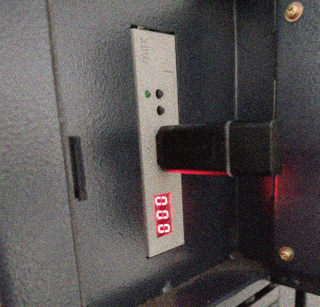
Few weeks ago I had to install Gotek floppy emulator into Makino U32K on one factory. Reason for that was that machine floppy drive had been damaged and floppy disks availability in 2023 is poor. One thing I wont miss from past are floppy disks, they were unreliable and usually started produce bad sectors after being used few times. I am happy that USB flash drives and writable optical media have replaced floppies in most use cases. Unfortunately there is lot of old equipment today in use (for example 90s Industrial machines and music workstations) where floppy drive is only way transfer data into the device. For example in U32K all expect string parameters can loaded over network, which is why stopping using disk drive is not option. Luckily there is simple soluction for the problem: Gotek Floppy emulator, which simulates floppy disks from USB flashdrive. It gives choice to continue using old device while using modern storage medium. I had multiple problems getting Gotek working with machine so in this
tutorial I go trough steps that may help other technicians to get Gotek
working with industrial machinery.
|
||||
|
Before getting Gotek floppy emulator, you should get information on machine current disk drive type, connector and supported floppy size. For example some Mitsubishi machines uses proprietary floppy connector and some old HAAS machines do not support other than 720k floppies. Luckily Makino U32K used standard 1.44M diskette drive so I could use regular Gotek 1.44MB SFR1M44-U100 drive. There also exist special versions of Gotek for different type of Industrial machines. Second thing you need to do is change disk drive type from machine settings
either to automatic or MS-DOS (1.44M). On U32K this is done by entering
7bit string into the parameters menu. Consult manufacturer manual how to
change those settings.
|
||||
|
Last step is to configure diskette drive itself to work with machine.
First I encountered problem where U32K gave me "6839 Disk inserted?"
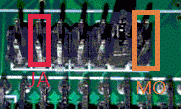
error when I was trying read diskette information. First I connected MO
(motor) pin with jumper and after that directory listing worked but trying
open any file failed for same error. After long search on the internet
I discovered information from JA jumper that sends "ready"
signal into the floppy controller. Without that machine did not know if
disk was in the drive. On picture below pins I connected with jumpers(picture
2). Leave S1 or s0 jumper in place, since this defines if floppy drive
primary or secondary on system.
Install the diskette drive according manufacture instruction manual. Before you switch power on the machine, plug flash drive of your choice into Gotek USB port and press two buttons in front of drive while turning power on. Number on drive LCD display goes from 000-999 then returns 000 once flash drive is ready. Unplug flash drive from diskette and connect it to computer to transfer required program data. On Windows you will only see one 1.44M partition due to way Windows handles flash drives (Windows only shows first partition). I am using Linux on my laptop so this was not issue to me, but if you want to use more than one virtual diskette under windows you will need tool for it (for example Batch manage tool). If you only need one diskette, drive will work on Windows like USB stick. Now try to read drive using machine. If it works, congratulations! You
just saved countless hours of troubleshooting time with this tutorial.
|
||||
|
© 2025 Nokiamies.All rights reserved. Copying, modifying, or republishing images, text, and all other material is without authors permission is strictly prohibited. Nokiamies.net is non-commercial hobby site and has no relation to Nokia corporation or entities. Nokia logo, Nokia brand and all brands and product names are (registered) trademarks of their respective owners. All guides on this site come without any warranty or liability. Any files offered to download from this site are downloaded at your own risk. Nokiamies.net is not responsible for any damage the software, downloads, or guides may cause. |